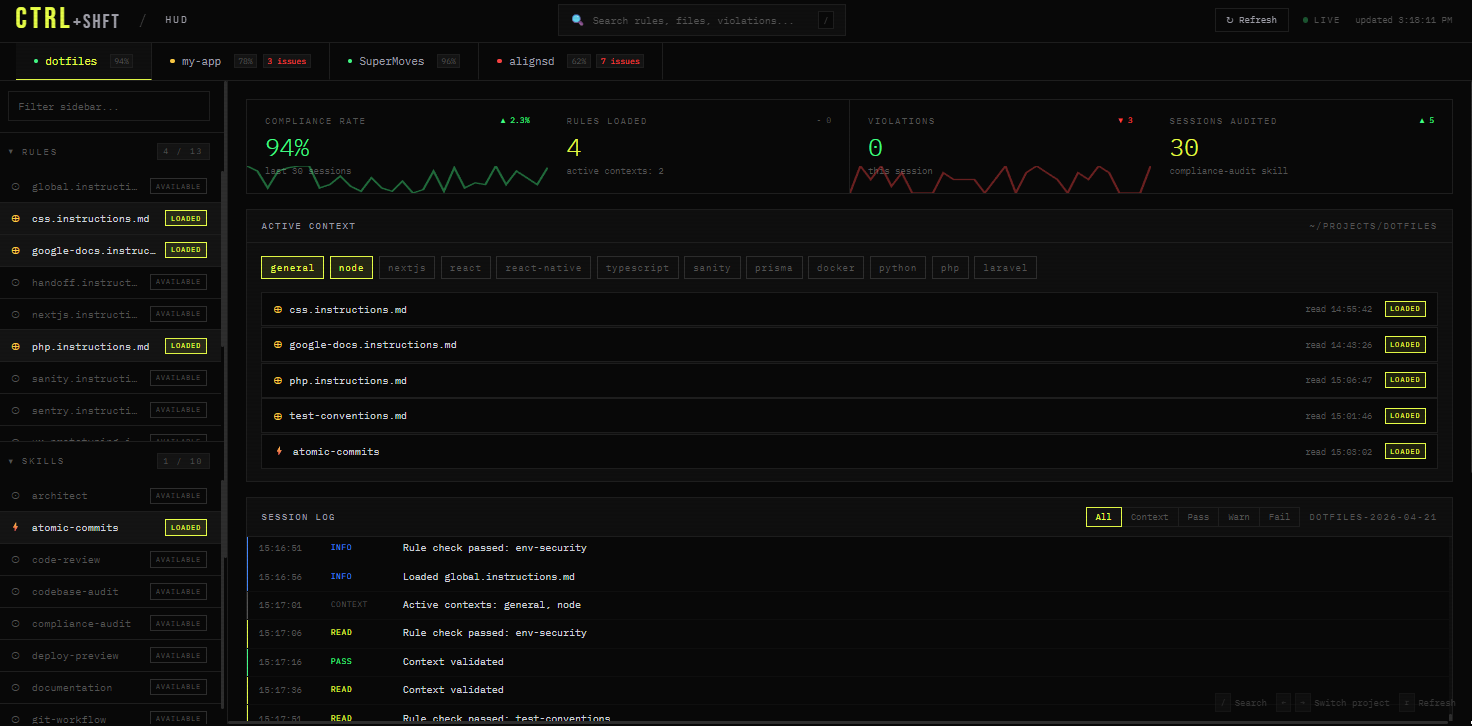
ctrl defines the rules.
shft executes them.
Every developer using Claude Code or Copilot hits the same walls. Context degrades mid-task. Instructions drift between machines. Secrets leak into the conversation. Irrelevant rules load for every project. One repo fixes all four.
Context degrades mid-task. The agent repeats itself, compaction loses nuance, quality drops. A fresh conversation has no idea where things left off.
Instructions drift between your laptop and VPS. Different machines run different rules. There's no single source of truth.
Secrets leak into agent context. API keys, tokens, passwords visible inside the conversation — or worse, logged somewhere they shouldn't be.
Irrelevant rules load for every project regardless of stack. Next.js rules on a PHP project. PHP rules in a Python repo. Noise drowning signal.
When context gets high, the agent writes its plan to working/.
A
fresh conversation continues exactly where the old one left off — no repetition, no lost nuance.
detect-context.sh scans your working directory. A Next.js
project
loads Next.js rules. Nothing from PHP. Nothing from Python. Only what matches.
Agents see config, never credentials. run-with-secrets.sh
injects
API keys into a child process — they vanish on exit. Deny rules block env,
printenv, and cat secrets/*.
Clone to ~/dotfiles on your laptop, your VPS, anywhere.
git pull updates every machine simultaneously. Bootstrap is idempotent — safe to
re-run
anytime.
/grill-me/write-a-prd/prd-to-issues/do-workshft/do-work/grill-me/write-a-prd/prd-to-issuestechnical-fellowskill-scaffolderexploreresearchcodebase-auditimprove-architecture/tddsystematic-debuggingskills/_local/your-skill/SKILL.md —
auto-discovered, gitignored.
Each subagent runs in an isolated context window with its own system prompt and tool restrictions. Exploration stays out of your main conversation.
Four behavioral rules in global.instructions.md, addressing the most expensive AI failure
modes: building wrong things,
overengineering, drive-by refactoring, and vague success criteria — derived from
Andrej Karpathy's observations on LLM coding
pitfalls
and adapted here for this workflow to bias toward correctness over speed.
Surface confusion before acting. Present multiple interpretations. Name assumptions explicitly. Push back when simpler exists. Clarifying questions come before implementation, not after a wrong turn.
Minimum code that solves the problem. No speculative features. No abstractions for single-use code. If 200 lines could be 50, rewrite it. Prefer straightforward solutions a senior engineer would call obvious and maintainable.
Touch only what you must. Match existing style exactly. Don't refactor what isn't broken. Every changed line traces to the user's request. Mention adjacent issues, but don't fold unrelated cleanup into the same diff.
Define success criteria. Loop until verified. Transform imperative tasks into verifiable goals with acceptance criteria at each step. Convert vague asks into outcomes that can be tested and proven.
Two tiers. run-with-secrets.sh injects credentials into a child process only — they exist
for
its lifetime and vanish when it exits. Deny rules block any attempt to read them.
| File | In Shell? | Agent-Visible? | Contains |
|---|---|---|---|
.env.agent |
YES | YES | Usernames, hosts, IDs |
.env.secrets |
NO | NO | API keys, tokens, passwords |
env, printenv, cat secrets/*, and
echo $*KEY* at the agent level. Agents can't accidentally inherit what they can't see.
Not a framework. A bash loop that runs Claude against your GitHub issues backlog — sandboxed in Docker for AFK mode, direct on host for HITL. Exits when the backlog is empty.
git clone https://github.com/arndvs/ctrl.git ~/dotfiles
bash ~/dotfiles/bin/bootstrap.sh
$EDITOR ~/dotfiles/secrets/.env.agent # non-sensitive config $EDITOR ~/dotfiles/secrets/.env.secrets # API keys and tokens
bash ~/dotfiles/bin/sync-settings.sh
source ~/.bashrc